
Cabinet: Difference between revisions
More actions
HollowArrow (talk | contribs) initial commit |
CrimsonWolf (talk | contribs) No edit summary |
||
| (21 intermediate revisions by 5 users not shown) | |||
| Line 1: | Line 1: | ||
The cabinet is the structure housing the payphone that contains the electrical and telephonic equipment needed for a [[Telstra Smart Payphone]] to be operational. Indoor payphones are typically very simple, whereas outdoor payphones additionally have a limited amount of cover from the weather. | The cabinet is the structure housing the payphone that contains the electrical and telephonic equipment needed for a [[Telstra Smart Payphone]] to be operational. Indoor payphones are typically very simple, whereas outdoor payphones additionally have a limited amount of cover from the weather. | ||
Very rarely, a payphone does not have a visible cabinet of any kind. | |||
== Standard cabinet types == | |||
This is a summary of the standard cabinet types: | |||
{| class="wikitable" | |||
|+Summary of standard cabinet types | |||
!Internal name | |||
!Photo | |||
!Size | |||
!Locations | |||
!Notes | |||
!Installation dates | |||
|- | |||
|Boulevard | |||
|[[File:Boulevard.jpg|thumb]] | |||
|Full width | |||
|Indoor and outdoor | |||
|Frame colour can come in various colours, such as blue, red, and green. | |||
|? | |||
|- | |||
|FLPC (Full length payphone cabinet) | |||
|[[File:FLPC.jpg|alt=FLPC|thumb]] | |||
|Full width | |||
|Outdoor | |||
| | |||
|? | |||
|- | |||
|Streetcab | |||
|[[File:Payphone-03983000X2-20260512074917.jpg|thumb]] | |||
|Full width | |||
|Outdoor | |||
|Thicker back than FLPC to hold advertisements | |||
|? | |||
|- | |||
|Prestige | |||
|[[File:Payphone-03841502X2-20260512090513.jpg|thumb]] | |||
|Full width | |||
|Outdoor | |||
|Early version of the Streetcab, mainly found in Melbourne | |||
|? | |||
|- | |||
|Majestic | |||
|[[File:Majestic.jpg|alt=Majestic Payphone Cabinet Type|thumb]] | |||
|Half width | |||
|Indoor and outdoor | |||
| | |||
|? | |||
|- | |||
|Telebox | |||
|[[File:Telebox.jpg|alt=Telebox|thumb]] | |||
|Half width | |||
|Indoor and outdoor | |||
|Table can be fully or partially slanted, or have no slant at all. | |||
|? | |||
|- | |||
|Clearline | |||
|[[File:Payphone-02625104X1-20260515130057.jpg|thumb]] | |||
|Slim | |||
|Indoor | |||
| | |||
|? | |||
|- | |||
|Slimline | |||
|[[File:Payphone-02963404X1-20260512033212.jpg|thumb]] | |||
|Slim | |||
|Indoor | |||
|May have lit orange hat, grey 4G antenna or no hat at all | |||
|? | |||
|- | |||
|Modular | |||
|[[File:Payphone-02978904X1-20260525074338.jpg|alt=Modular|thumb]] | |||
|Slim | |||
|Indoor | |||
|Reportedly less than 50 exist, all inside shopping centres | |||
|? | |||
|- | |||
|Digital | |||
|[[File:Payphone-08829401X2-20260508 222647.jpg|thumb]] | |||
|Double width | |||
|Outdoor | |||
|At least two different versions exist. | |||
Some have had the screen on the phone side replaced with a static poster (as in photo). | |||
== | Has a USB-A charging port on the right side of the phone. | ||
|? | |||
|- | |||
|Billboard (JCDecaux Booth) | |||
|[[File:Billboard.jpg|alt=Billboard (JCD Booth)|thumb]] | |||
|Double width | |||
|Outdoor | |||
|Exclusive to certain areas of Sydney, these Cabinet types have several different variations. | |||
Some have Digital advertising screens on the back and some have static posters. | |||
These cabinets mostly have a map or an advertising space in place of a second phone. | |||
There are also different variations of the glass on these cabinets, with some having the standard Telstra Majestic glass and branding on them. | |||
|1997 | |||
|- | |||
|Red Box/Heritage | |||
|[[File:Payphone-08853622X2-20260511113756.jpg|thumb]] | |||
|Full width | |||
|Outdoor | |||
| | |||
|? | |||
|- | |||
|? | |||
|[[File:Payphone-02628400X2-20260513100000.jpg|thumb]] | |||
|Double Width | |||
|Outdoor | |||
|Rugged all metal anti-vandalism cabinet design | |||
|? | |||
|} | |||
Note that there is some level of variation in the construction of some of these models. There are also a very small number of custom-built cabinets that do not match any of standard designs above. Finally, some payphones are directly mounted onto building walls and do not have a cabinet of any kind. | |||
== ID panel == | |||
All cabinets have a ID panel that shows: | |||
* the Payphone Identification Number | |||
* the Payphone Telephone Number | |||
* the address where the payphone is located | |||
* how to use the phone | |||
* important phone numbers | |||
The panel consists of a piece of paper behind a perspex window, except for the Digital type cabinet, where it is printed directly onto a piece of black plastic. Depending on the cabinet, the panel can be found on the left, right or above the phone. Phones without a cabinet will have a similar panel attached nearby. | |||
=== Payphone Identification Number === | |||
As the name suggests, this number is the preferred way to refer to a specific payphone as it does not change, unlike the telephone number. It consists of 10 characters, with the second last always being a letter and the rest being numbers. The first eight digits is all that is needed to uniquely identify a phone, with the first six being an area code for the exchange the phone is connected to. The last two digits identify the type of phone fitted at that location:<ref>https://whrl.pl/RdZvay</ref> | |||
{| class="wikitable" | |||
!Type Code | |||
!Phone Model | |||
|- | |||
|B1, B2 | |||
|Card/Eftpos Phone | |||
|- | |||
|C4 | |||
|Gold Phone, Credit Phone | |||
|- | |||
|K2 | |||
|Multimedia Phone | |||
|- | |||
|L5, L6 | |||
|Blue/Red Phone | |||
|- | |||
|M6, M7 | |||
|Green Phone | |||
|- | |||
|P1, P2, S1, S2 | |||
|Phonecard Phone | |||
|- | |||
|X1, X2, X7, X8, X9 | |||
|[[Telstra Smart Payphone|Smart Payphone]] | |||
|- | |||
|Y1, Y2, Y7, Y8, Y9 | |||
|Smart Payphone (card only) | |||
|} | |||
As Smart Payphones have taken over all older models, only X and Y can be found in the field now. It is unknown what the number refers to, however X2 is the most common and the other numbers are usually found in indoor locations. Y (card only) phones are only found in areas where it was impractical to regularly empty the coinbox due to there being no road access or very remote location. | |||
== Attachments == | |||
Most cabinets have a coloured dome that forms the top. The standard colours are orange for a standard payphone and magenta for payphones with [[Telstra Air|free Wi-Fi]], although a limited run of other colours were also installed as part of Telstra's "Life in Full Colour" rebrand in 2011. The hat typically contains a light to illuminate the logo on the outside, and sometimes a router to provide the free Wi-Fi. | |||
Some payphones also have a magenta cube fitted above the hat. This usually contains the router that provides free Wi-Fi and/or the LTE modem that allows the phone to function. This cube has Wi-Fi symbols on it if the payphone has free Wi-Fi enabled and is blank otherwise. | |||
Some payphones have a dark grey "blade" instead of the cube. This is an enclosure for a LTE antenna.<gallery> | |||
File:Payphone-02434403X2-20260512012023.jpg|A Telebox with a standard orange dome | |||
File:Payphone-02954707X2-20260509113533.jpg|A Steetcab with a pink dome (Wi-Fi enabled) | |||
File:Payphone-02957012X2-20260509115902.jpg|A Majestic cabinet with a magenta dome and cube (Wi-Fi enabled) | |||
File:Payphone-02422685X2-20260507055309.jpg|A Telebox with an orange dome and magenta cube (non Wi-Fi enabled) | |||
File:Payphone-07557320X1-20260506101708.jpg|A Slimline with a grey blade | |||
File:Payphone-07552980X1-20260506104756.jpg|A Telebox with an orange dome and grey blade | |||
</gallery> | |||
Latest revision as of 02:14, 18 June 2026
The cabinet is the structure housing the payphone that contains the electrical and telephonic equipment needed for a Telstra Smart Payphone to be operational. Indoor payphones are typically very simple, whereas outdoor payphones additionally have a limited amount of cover from the weather.
Very rarely, a payphone does not have a visible cabinet of any kind.
Standard cabinet types
This is a summary of the standard cabinet types:
| Internal name | Photo | Size | Locations | Notes | Installation dates |
|---|---|---|---|---|---|
| Boulevard |  |
Full width | Indoor and outdoor | Frame colour can come in various colours, such as blue, red, and green. | ? |
| FLPC (Full length payphone cabinet) |  |
Full width | Outdoor | ? | |
| Streetcab |  |
Full width | Outdoor | Thicker back than FLPC to hold advertisements | ? |
| Prestige |  |
Full width | Outdoor | Early version of the Streetcab, mainly found in Melbourne | ? |
| Majestic |  |
Half width | Indoor and outdoor | ? | |
| Telebox |  |
Half width | Indoor and outdoor | Table can be fully or partially slanted, or have no slant at all. | ? |
| Clearline |  |
Slim | Indoor | ? | |
| Slimline |  |
Slim | Indoor | May have lit orange hat, grey 4G antenna or no hat at all | ? |
| Modular |  |
Slim | Indoor | Reportedly less than 50 exist, all inside shopping centres | ? |
| Digital |  |
Double width | Outdoor | At least two different versions exist.
Some have had the screen on the phone side replaced with a static poster (as in photo). Has a USB-A charging port on the right side of the phone. |
? |
| Billboard (JCDecaux Booth) |  |
Double width | Outdoor | Exclusive to certain areas of Sydney, these Cabinet types have several different variations.
Some have Digital advertising screens on the back and some have static posters. These cabinets mostly have a map or an advertising space in place of a second phone. There are also different variations of the glass on these cabinets, with some having the standard Telstra Majestic glass and branding on them. |
1997 |
| Red Box/Heritage |  |
Full width | Outdoor | ? | |
| ? |  |
Double Width | Outdoor | Rugged all metal anti-vandalism cabinet design | ? |
Note that there is some level of variation in the construction of some of these models. There are also a very small number of custom-built cabinets that do not match any of standard designs above. Finally, some payphones are directly mounted onto building walls and do not have a cabinet of any kind.
ID panel
All cabinets have a ID panel that shows:
- the Payphone Identification Number
- the Payphone Telephone Number
- the address where the payphone is located
- how to use the phone
- important phone numbers
The panel consists of a piece of paper behind a perspex window, except for the Digital type cabinet, where it is printed directly onto a piece of black plastic. Depending on the cabinet, the panel can be found on the left, right or above the phone. Phones without a cabinet will have a similar panel attached nearby.
Payphone Identification Number
As the name suggests, this number is the preferred way to refer to a specific payphone as it does not change, unlike the telephone number. It consists of 10 characters, with the second last always being a letter and the rest being numbers. The first eight digits is all that is needed to uniquely identify a phone, with the first six being an area code for the exchange the phone is connected to. The last two digits identify the type of phone fitted at that location:[1]
| Type Code | Phone Model |
|---|---|
| B1, B2 | Card/Eftpos Phone |
| C4 | Gold Phone, Credit Phone |
| K2 | Multimedia Phone |
| L5, L6 | Blue/Red Phone |
| M6, M7 | Green Phone |
| P1, P2, S1, S2 | Phonecard Phone |
| X1, X2, X7, X8, X9 | Smart Payphone |
| Y1, Y2, Y7, Y8, Y9 | Smart Payphone (card only) |
As Smart Payphones have taken over all older models, only X and Y can be found in the field now. It is unknown what the number refers to, however X2 is the most common and the other numbers are usually found in indoor locations. Y (card only) phones are only found in areas where it was impractical to regularly empty the coinbox due to there being no road access or very remote location.
Attachments
Most cabinets have a coloured dome that forms the top. The standard colours are orange for a standard payphone and magenta for payphones with free Wi-Fi, although a limited run of other colours were also installed as part of Telstra's "Life in Full Colour" rebrand in 2011. The hat typically contains a light to illuminate the logo on the outside, and sometimes a router to provide the free Wi-Fi.
Some payphones also have a magenta cube fitted above the hat. This usually contains the router that provides free Wi-Fi and/or the LTE modem that allows the phone to function. This cube has Wi-Fi symbols on it if the payphone has free Wi-Fi enabled and is blank otherwise.
Some payphones have a dark grey "blade" instead of the cube. This is an enclosure for a LTE antenna.
-
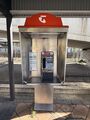 A Telebox with a standard orange dome
 -
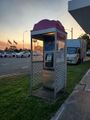 A Steetcab with a pink dome (Wi-Fi enabled)
 -
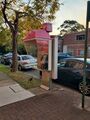 A Majestic cabinet with a magenta dome and cube (Wi-Fi enabled)
 -
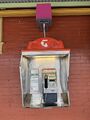 A Telebox with an orange dome and magenta cube (non Wi-Fi enabled)
 -
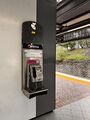 A Slimline with a grey blade
 -
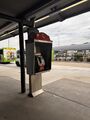 A Telebox with an orange dome and grey blade


