
Telstra Smart Payphone: Difference between revisions
More actions
m added functionalty section |
CrimsonWolf (talk | contribs) No edit summary |
||
| (4 intermediate revisions by 2 users not shown) | |||
| Line 1: | Line 1: | ||
[[File:Majestic.jpg|thumb|Telstra Smart Payphone]] | [[File:Majestic.jpg|thumb|Telstra Smart Payphone]] | ||
The '''Telstra Smart Payphone''' is the current standard public telephone used by [[Telstra]] in Australia. It replaced earlier | The '''Telstra Smart Payphone''' is the current standard public telephone used by [[Telstra]] in Australia. It has now fully replaced earlier payphone models and as such is the only type encountered while playing Payphone Tag. | ||
Telstra describes the Smart Payphone as its latest public payphone. Published features include SMS sending to Australian mobiles, a large back-lit display showing the number dialled and remaining credit, visual or audible low-credit and end-of-call warnings, a hearing-aid coupler, four-step volume control, and redial.<ref name="telstra-smart">''Telstra Smart Payphone'', Telstra Consumer Advice, [https://www.telstra.com.au/consumer-advice/payphones/smart-payphone](https://www.telstra.com.au/consumer-advice/payphones/smart-payphone). Accessed 3 May 2026.</ref> | Telstra describes the Smart Payphone as its latest public payphone. Published features include SMS sending to Australian mobiles, a large back-lit display showing the number dialled and remaining credit, visual or audible low-credit and end-of-call warnings, a hearing-aid coupler, four-step volume control, and redial.<ref name="telstra-smart">''Telstra Smart Payphone'', Telstra Consumer Advice, [https://www.telstra.com.au/consumer-advice/payphones/smart-payphone](https://www.telstra.com.au/consumer-advice/payphones/smart-payphone). Accessed 3 May 2026.</ref> | ||
| Line 7: | Line 7: | ||
== Functionality == | == Functionality == | ||
When picking up the handset of the payphone, the phone will show a boot screen. | When not in use, the phone is in the standby state. The screen will display a pre-programmed message, usually "FREE NATIONAL CALLS AUSTRALIA IS WHY".[[File:Payphone boot.jpg|thumb|The boot screen of the [[Telstra Smart Payphone]]]]When picking up the handset of the payphone, the phone will show a boot screen. | ||
Shortly after, you will reach the main screen. Payment should be made at this point if required for the call, by inserting a phonecard (coins were also accepted in the past). Here you can enter the phone number to call, or press OK to enter a menu for other functions. | |||
After about 60 seconds of inactivity, the phone will return to the standby state, even if the handset is not replaced. | |||
=== Outbound Calls === | |||
From the main screen, dial the number to call with the keypad. The phone will immediately show an error message if you dial a prefix that it cannot call, such as 05 (an unallocated range for mobile numbers) or 19 (premium rate numbers). | |||
Once you have finished dialling and making any required payment, the phone will attempt to place the call after a few seconds. The screen will show "FREE CALL" once this has occurred. | |||
While the call is connected, you can still dial as on any other phone to respond to interactive voice prompts or menus. These numbers will show on the screen. For most phones, caller ID is enabled, however there are some sensitive locations where phones are programmed to display as private number. | |||
Once the call is concluded, the screen does not change, although you will hear the disconnect tone as normal. You can now replace the handset to put the phone back to standby or press the FOLLOW ON button under the handset to make another call. | |||
=== Inbound calls === | |||
Almost all Telstra Smart Payphones can receive incoming calls. The payphone will usually ring and can be answered by lifting the handset. Some phones may not ring but only display '''INCOMING CALL''' on the screen. At more sensitive locations, the call may not be able to be answered at all, the screen will change to '''SERVICE NOT AVAILABLE - HANG UP''' rather than connecting the incoming call. | |||
=== SMS === | |||
From the OK menu, you can press 1 to write your own message to send or 2 to choose from a list of pre-written messages. | |||
The phone will attempt the send the SMS immediately, however if an error occurs, it will periodically retry for up to 7 days, after which it will be discarded. | |||
Unlike for outgoing calls where the caller ID is the payphone's number, the caller ID TLSPayphone is used for SMS. Instead, the following text is appended to the end of your message: "<phone number> - NO REPLY only call back allowed". | |||
As noted, there is no way to receive SMS at a payphone. | |||
== | === Program auto-dial === | ||
From the OK menu, press 3 then follow the prompts to program an auto-dial number to a [[phonecard]]. An error message is displayed if no phonecard has been inserted, and you will be returned to the main screen. | |||
=== | === Email === | ||
Option 4 on the OK menu is email, however this feature was never implemented and it simply displays COMING SOON when selected. | |||
=== Keypad === | |||
The keypad contains 4 function keys, 2 arrow keys (up/down) and the 12 standard number keys (0-9, * and #). | |||
The 4 function keys are: | |||
* '''Card changeover:''' uses up all remaining credit on the currently inserted phonecard and allows the card to be changed for another | |||
* '''Volume''': toggles between low, medium and high settings | |||
* '''Language:''' allows the language to be changed | |||
* '''OK:''' used to open the additional features menu and for certain functions (e.g. SMS) | |||
== History == | |||
Public telephones have been part of the Australian telephone network since the 1880s. The Telstra Smart Payphone belongs to the late-1990s generation of electronic public telephones designed around smartcard payment, display-based prompting, programmable tariffs and automatic fault reporting. | |||
Contemporary press coverage in ''The Sydney Morning Herald'' shows Telstra's smart-card public telephone technology was being covered publicly during the late-1990s rollout period.<ref name="smh-smart">''Using our new Smart Payphones and Smart Phonecards is easy'', Telstra advertisement, ''The Sydney Morning Herald'', Fairfax Media clipping via Newspapers.com, [https://fairfaxmedia.newspapers.com/article/the-sydney-morning-herald-telstra-smart/196788410/](https://fairfaxmedia.newspapers.com/article/the-sydney-morning-herald-telstra-smart/196788410/). Accessed 3 May 2026.</ref> | |||
Collector sources identify the Australian Smart Payphone as part of the Amper-developed '''MPP''' or '''Multi Purpose Payphone''' platform, with early units made in Spain and adapted for Australian weather and vandal-resistance.<ref name="payphonestory-ct10">''Telstra Smart Payphone (MPP X1)'', Pay phone Story, 28 May 2025, [https://payphonestory.com/2025/05/28/ct-10-telstra-smart-payphone/](https://payphonestory.com/2025/05/28/ct-10-telstra-smart-payphone/). Accessed 3 May 2026.</ref> The model is commonly said to have been introduced in 1997 to replace the CT3 series, with early deployments in Adelaide, Perth, Brisbane and Sydney.<ref name="payphonestory-ct10" /> The current manufacturer appears to be '''Infopyme Comunicaciones''', a Spanish public-telephony manufacturer that describes itself as designing, manufacturing, assembling and repairing public telephones and spare parts for operators around the world.<ref name="infopyme-company">''Manufacture, assembly and repair of public telephones'', Infopyme Comunicaciones, [https://www.infopyme.com/en/company/public-payphones-manufacturer](https://www.infopyme.com/en/company/public-payphones-manufacturer). Accessed 3 May 2026.</ref> | |||
The Telstra Smart Payphone appears to be a Telstra-specific variant of Infopyme's '''TMI''' public-payphone platform, or of the same Amper/Siemens-Elasa/Infopyme product lineage. This identification is based on manufacturer lineage and visual/collector comparison rather than a Telstra-published model sheet, so it should be treated as probable rather than formally confirmed. | |||
Early units were reportedly modified or retrofitted after problems with durability, weather exposure and vandalism. Later Australian examples have heavier stainless-steel casing and improved coin-security hardware on coin-capable variants.<ref name="payphonestory-ct10" /> | |||
At some point in the mid-2000s, the Smart Payphone firmware and/or service platform was updated to allow SMS sending. Telstra's current payphone terms state that some public payphones can send SMS messages to compatible Australian mobile and fixed services, although payphones cannot receive SMS replies.<ref name="telstra-terms">''Public Payphones Section: Our Customer Terms'', Telstra, last changed 9 November 2023, [https://www.telstra.com.au/content/dam/tcom/personal/consumer-advice/pdf/pubpayphones.pdf](https://www.telstra.com.au/content/dam/tcom/personal/consumer-advice/pdf/pubpayphones.pdf). Accessed 3 May 2026.</ref> | |||
In 2019 Telstra enabled incoming calls on many public payphones. Telstra later stated that publicly accessible payphones could receive incoming telephone calls, and Telstra's current public-payphone terms state that some payphones allow incoming calls at no charge.<ref name="telstra-2019-media">''Payphones deliver vital community service'', Telstra, 11 October 2019, [https://www.telstra.com.au/aboutus/media/media-releases/Payphones-deliver-vital-community-service](https://www.telstra.com.au/aboutus/media/media-releases/Payphones-deliver-vital-community-service). Accessed 3 May 2026.</ref><ref name="telstra-terms" /> | |||
In August 2021 Telstra made local calls, national calls to standard fixed-line numbers and calls to standard Australian mobiles free from public payphones.<ref name="telstra-freecalls">''Why we’re making payphones free for calls around Australia'', Telstra Exchange, 29 September 2022, [https://www.telstra.com.au/exchange/payphones-free-for-calls-australia](https://www.telstra.com.au/exchange/payphones-free-for-calls-australia). Accessed 3 May 2026.</ref> Coin acceptance ended from 8 October 2021.<ref name="telstra-payphones" /> | |||
== Connectivity == | |||
Telstra payphones were initially connected to the network via copper cables (POTS - plain old telephone service). Later on, ADSL (asymmetric digital subscriber line) was added to provide SMS and eventually Wi-Fi services. With the ongoing rollout of the NBN, copper is being phased out and so gradually many phones have been migrated to connect over the LTE (4G) cellular network. In rare cases, phones have instead been connected to the NBN fibre network. | |||
Phones on the LTE network can be identified by their phone number being a mobile number (beginning with 04). Both ADSL and fibre phones have landline numbers. | |||
== Variations == | |||
There are a number of different variations on the standard Smart Payphone that can spotted in field: | |||
* '''Coin Mechanism:''' A very small number of payphones were built without a coin mechanism at all and do not have a coin slot at all. Slightly more have a coin slot covered with a metal plate that reads "CARDS ONLY". Both variations have a rectangular outline where the change slot should be. It is likely these pre-date domestic calls being free and were only placed in areas where another coin-accepting phone was nearby. | |||
* '''Change slot:''' After call acceptance stopped, some payphones had their change slot removed and replaced with a USB charger. One USB-A and one USB-C port is provided, however only one can be used at a time.[[File:Payphone-02974020X2-20260524105708.jpg|thumb|A vandal resistant payphone]] | |||
* '''Vandal resistant casing:''' Some payphones have a thicker casing for vandal resistance. It can be identified by the keys sticking up less from the casing and the missing decal slot above the screen. | |||
* '''Payphone TTY:''' Around 100 Telstra payphones were retrofitted with a '''[[TTY]]''' (teletypewriter) facility for people who are deaf or have a communication impairment. TTY-equipped payphones can be found through Telstra's Payphone Locator by searching for the ''Teletypewriter (TTY)'' feature.<ref name="telstra-tty">''TTY Payphones'', Telstra Consumer Advice, [https://www.telstra.com.au/consumer-advice/payphones/tty-payphones](https://www.telstra.com.au/consumer-advice/payphones/tty-payphones). Accessed 3 May 2026.</ref> The TTY keyboard used with Telstra payphones is an '''Ultratec Pay Phone TDD''' keyboard. The keyboard slides out when TTY tones are detected over the phone line. Many units appear to have seen little regular use in recent years, so players should not assume that the TTY attachment is working unless tested. Additionally, due to hardware incompatibilities, TTY currently does not work on payphones connected to the LTE network (ie. any phone with a 04 number). Telstra is aware of the issue and has stated they are working on a solution. | |||
The | == Charges == | ||
The following services are free: | |||
* Local and national landline calls | |||
* National mobile calls | |||
* Calls to 13 and 1300 (local rate) numbers | |||
* Calls to 1800 (free call) numbers | |||
* Domestic SMS | |||
These services are not free and charged in 50c increments: | |||
* Calls to satellite numbers | |||
* International calls | |||
Rates for each type of call can be found in Telstra's payphone terms.<ref name="telstra-terms" /> | |||
== Related payphones in other countries == | == Related payphones in other countries == | ||
Latest revision as of 11:43, 4 June 2026

The Telstra Smart Payphone is the current standard public telephone used by Telstra in Australia. It has now fully replaced earlier payphone models and as such is the only type encountered while playing Payphone Tag.
Telstra describes the Smart Payphone as its latest public payphone. Published features include SMS sending to Australian mobiles, a large back-lit display showing the number dialled and remaining credit, visual or audible low-credit and end-of-call warnings, a hearing-aid coupler, four-step volume control, and redial.[1]
Although still generally called a payphone, ordinary domestic use of Telstra public phones is now free. Telstra states that standard national and mobile calls are free from all Telstra payphones, and that from 8 October 2021 payphones stopped accepting coins. Calls to international and other charged destinations require a Telstra Phonecard or other third-party calling card.[2]
Functionality
When not in use, the phone is in the standby state. The screen will display a pre-programmed message, usually "FREE NATIONAL CALLS AUSTRALIA IS WHY".

When picking up the handset of the payphone, the phone will show a boot screen.
Shortly after, you will reach the main screen. Payment should be made at this point if required for the call, by inserting a phonecard (coins were also accepted in the past). Here you can enter the phone number to call, or press OK to enter a menu for other functions.
After about 60 seconds of inactivity, the phone will return to the standby state, even if the handset is not replaced.
Outbound Calls
From the main screen, dial the number to call with the keypad. The phone will immediately show an error message if you dial a prefix that it cannot call, such as 05 (an unallocated range for mobile numbers) or 19 (premium rate numbers).
Once you have finished dialling and making any required payment, the phone will attempt to place the call after a few seconds. The screen will show "FREE CALL" once this has occurred.
While the call is connected, you can still dial as on any other phone to respond to interactive voice prompts or menus. These numbers will show on the screen. For most phones, caller ID is enabled, however there are some sensitive locations where phones are programmed to display as private number.
Once the call is concluded, the screen does not change, although you will hear the disconnect tone as normal. You can now replace the handset to put the phone back to standby or press the FOLLOW ON button under the handset to make another call.
Inbound calls
Almost all Telstra Smart Payphones can receive incoming calls. The payphone will usually ring and can be answered by lifting the handset. Some phones may not ring but only display INCOMING CALL on the screen. At more sensitive locations, the call may not be able to be answered at all, the screen will change to SERVICE NOT AVAILABLE - HANG UP rather than connecting the incoming call.
SMS
From the OK menu, you can press 1 to write your own message to send or 2 to choose from a list of pre-written messages.
The phone will attempt the send the SMS immediately, however if an error occurs, it will periodically retry for up to 7 days, after which it will be discarded.
Unlike for outgoing calls where the caller ID is the payphone's number, the caller ID TLSPayphone is used for SMS. Instead, the following text is appended to the end of your message: "<phone number> - NO REPLY only call back allowed".
As noted, there is no way to receive SMS at a payphone.
Program auto-dial
From the OK menu, press 3 then follow the prompts to program an auto-dial number to a phonecard. An error message is displayed if no phonecard has been inserted, and you will be returned to the main screen.
Option 4 on the OK menu is email, however this feature was never implemented and it simply displays COMING SOON when selected.
Keypad
The keypad contains 4 function keys, 2 arrow keys (up/down) and the 12 standard number keys (0-9, * and #).
The 4 function keys are:
- Card changeover: uses up all remaining credit on the currently inserted phonecard and allows the card to be changed for another
- Volume: toggles between low, medium and high settings
- Language: allows the language to be changed
- OK: used to open the additional features menu and for certain functions (e.g. SMS)
History
Public telephones have been part of the Australian telephone network since the 1880s. The Telstra Smart Payphone belongs to the late-1990s generation of electronic public telephones designed around smartcard payment, display-based prompting, programmable tariffs and automatic fault reporting.
Contemporary press coverage in The Sydney Morning Herald shows Telstra's smart-card public telephone technology was being covered publicly during the late-1990s rollout period.[3]
Collector sources identify the Australian Smart Payphone as part of the Amper-developed MPP or Multi Purpose Payphone platform, with early units made in Spain and adapted for Australian weather and vandal-resistance.[4] The model is commonly said to have been introduced in 1997 to replace the CT3 series, with early deployments in Adelaide, Perth, Brisbane and Sydney.[4] The current manufacturer appears to be Infopyme Comunicaciones, a Spanish public-telephony manufacturer that describes itself as designing, manufacturing, assembling and repairing public telephones and spare parts for operators around the world.[5]
The Telstra Smart Payphone appears to be a Telstra-specific variant of Infopyme's TMI public-payphone platform, or of the same Amper/Siemens-Elasa/Infopyme product lineage. This identification is based on manufacturer lineage and visual/collector comparison rather than a Telstra-published model sheet, so it should be treated as probable rather than formally confirmed.
Early units were reportedly modified or retrofitted after problems with durability, weather exposure and vandalism. Later Australian examples have heavier stainless-steel casing and improved coin-security hardware on coin-capable variants.[4]
At some point in the mid-2000s, the Smart Payphone firmware and/or service platform was updated to allow SMS sending. Telstra's current payphone terms state that some public payphones can send SMS messages to compatible Australian mobile and fixed services, although payphones cannot receive SMS replies.[6]
In 2019 Telstra enabled incoming calls on many public payphones. Telstra later stated that publicly accessible payphones could receive incoming telephone calls, and Telstra's current public-payphone terms state that some payphones allow incoming calls at no charge.[7][6]
In August 2021 Telstra made local calls, national calls to standard fixed-line numbers and calls to standard Australian mobiles free from public payphones.[8] Coin acceptance ended from 8 October 2021.[2]
Connectivity
Telstra payphones were initially connected to the network via copper cables (POTS - plain old telephone service). Later on, ADSL (asymmetric digital subscriber line) was added to provide SMS and eventually Wi-Fi services. With the ongoing rollout of the NBN, copper is being phased out and so gradually many phones have been migrated to connect over the LTE (4G) cellular network. In rare cases, phones have instead been connected to the NBN fibre network.
Phones on the LTE network can be identified by their phone number being a mobile number (beginning with 04). Both ADSL and fibre phones have landline numbers.
Variations
There are a number of different variations on the standard Smart Payphone that can spotted in field:
- Coin Mechanism: A very small number of payphones were built without a coin mechanism at all and do not have a coin slot at all. Slightly more have a coin slot covered with a metal plate that reads "CARDS ONLY". Both variations have a rectangular outline where the change slot should be. It is likely these pre-date domestic calls being free and were only placed in areas where another coin-accepting phone was nearby.
- Change slot: After call acceptance stopped, some payphones had their change slot removed and replaced with a USB charger. One USB-A and one USB-C port is provided, however only one can be used at a time.
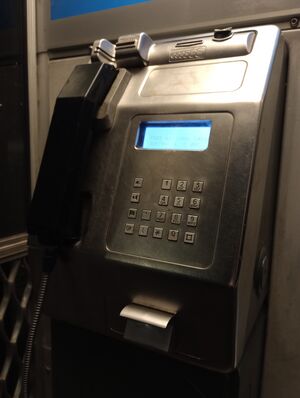
A vandal resistant payphone - Vandal resistant casing: Some payphones have a thicker casing for vandal resistance. It can be identified by the keys sticking up less from the casing and the missing decal slot above the screen.
- Payphone TTY: Around 100 Telstra payphones were retrofitted with a TTY (teletypewriter) facility for people who are deaf or have a communication impairment. TTY-equipped payphones can be found through Telstra's Payphone Locator by searching for the Teletypewriter (TTY) feature.[9] The TTY keyboard used with Telstra payphones is an Ultratec Pay Phone TDD keyboard. The keyboard slides out when TTY tones are detected over the phone line. Many units appear to have seen little regular use in recent years, so players should not assume that the TTY attachment is working unless tested. Additionally, due to hardware incompatibilities, TTY currently does not work on payphones connected to the LTE network (ie. any phone with a 04 number). Telstra is aware of the issue and has stated they are working on a solution.

Charges
The following services are free:
- Local and national landline calls
- National mobile calls
- Calls to 13 and 1300 (local rate) numbers
- Calls to 1800 (free call) numbers
- Domestic SMS
These services are not free and charged in 50c increments:
- Calls to satellite numbers
- International calls
Rates for each type of call can be found in Telstra's payphone terms.[6]
Related payphones in other countries
The Telstra Smart Payphone was not a completely unique Australian concept. Similar or related Amper/Siemens-Elasa/Infopyme public telephones appeared in several other countries, sometimes with different housings, tariffing and operator-specific software.
Germany
Germany had TELE-RUF Smart Payphones, a privately operated late-1990s/early-2000s smart-payphone system. Collector documentation identifies the TELE-RUF units as using hardware based on the Amper-developed MPP platform also used in Australia's Telstra CT-10/Smart Payphone.[10]
These German phones advertised cheap calls and mobile-era digital services such as SMS, ringtone downloads and digital content delivery.[10]
Croatia
Croatia has used public payphones operated by Hrvatski Telekom. Some older Croatian card payphones have been visually identified by collectors as being part of the same or a closely related Siemens/Amper platform family, but this should be treated cautiously unless supported by a manufacturer plate or primary source.
Hrvatski Telekom later modernised some public payphone sites into digital smart-phone booths. In 2017 Hrvatski Telekom and Vendotel installed ten smart payphones in Zadar with free Wi-Fi, ticketing, voucher sales and other services.[11] In 2018 Hrvatski Telekom and Go2Digital announced the replacement of existing public payphones with digital payphones offering Wi-Fi, wireless charging, sensors, navigation information, digital advertising and an SOS key.[12]
Cuba
Cuba's ETECSA public telephone network has used several public telephone technologies, including Siemens-Elasa and Amper/Siemens-Elasa equipment. Cuban service-quality material has listed public-telephone technologies including Siemens Elasa and Amper coin and card telephone equipment.
Cuban public phones remained important well into the smartphone era because public-phone calls were much cheaper than mobile calls. A 2017 report stated that Cuba had 59,818 public phones at the end of the previous year, including 8,588 coin-operated phones.[13]
Russia
Russia, particularly Moscow's MGTS public-payphone network, used Amper and Siemens-Elasa equipment during the transition from token-operated phones to card and coin-card public phones. Russian metrology-register material lists Amper-Siemens-Elasa card-payphone tariff equipment, including TPM-PC/S and TPM-MM/P models, manufactured in Spain.[14]
Moscow also trialled Siemens Elasa internet payphones in 2003, with reports stating that MGTS planned to install a small trial batch able to provide voice calls, internet access, email, text messages and multimedia messages.[15]
References
- ↑ Telstra Smart Payphone, Telstra Consumer Advice, [1](https://www.telstra.com.au/consumer-advice/payphones/smart-payphone). Accessed 3 May 2026.
- ↑ 2.0 2.1 Payphone services, Telstra Consumer Advice, [2](https://www.telstra.com.au/consumer-advice/payphones). Accessed 3 May 2026.
- ↑ Using our new Smart Payphones and Smart Phonecards is easy, Telstra advertisement, The Sydney Morning Herald, Fairfax Media clipping via Newspapers.com, [3](https://fairfaxmedia.newspapers.com/article/the-sydney-morning-herald-telstra-smart/196788410/). Accessed 3 May 2026.
- ↑ 4.0 4.1 4.2 Telstra Smart Payphone (MPP X1), Pay phone Story, 28 May 2025, [4](https://payphonestory.com/2025/05/28/ct-10-telstra-smart-payphone/). Accessed 3 May 2026.
- ↑ Manufacture, assembly and repair of public telephones, Infopyme Comunicaciones, [5](https://www.infopyme.com/en/company/public-payphones-manufacturer). Accessed 3 May 2026.
- ↑ 6.0 6.1 6.2 Public Payphones Section: Our Customer Terms, Telstra, last changed 9 November 2023, [6](https://www.telstra.com.au/content/dam/tcom/personal/consumer-advice/pdf/pubpayphones.pdf). Accessed 3 May 2026.
- ↑ Payphones deliver vital community service, Telstra, 11 October 2019, [7](https://www.telstra.com.au/aboutus/media/media-releases/Payphones-deliver-vital-community-service). Accessed 3 May 2026.
- ↑ Why we’re making payphones free for calls around Australia, Telstra Exchange, 29 September 2022, [8](https://www.telstra.com.au/exchange/payphones-free-for-calls-australia). Accessed 3 May 2026.
- ↑ TTY Payphones, Telstra Consumer Advice, [9](https://www.telstra.com.au/consumer-advice/payphones/tty-payphones). Accessed 3 May 2026.
- ↑ 10.0 10.1 German Phone Booth – TELE-RUF Smart Payphones, Pay phone Story, 16 April 2026, [10](https://payphonestory.com/2026/04/16/german-phone-booth-tele-ruf-smart-payphones/). Accessed 3 May 2026.
- ↑ Hrvatski Telekom with its partner Vendotel installed in Zadar first smart phone booths in Croatia, Hrvatski Telekom, 2 May 2017, [11](https://www.t.ht.hr/en/Press/press-releases/3626/Hrvatski-Telekom-with-its-partner-Vendotel-installed-in-Zadar-first-smart-phone-booths-in-Croatia.html). Accessed 3 May 2026.
- ↑ Hrvatski Telekom and Go2Digital start modernization of public pay phones, Hrvatski Telekom, 12 June 2018, [12](https://www.t.ht.hr/en/Press/press-releases/4186/Hrvatski-Telekom-and-Go2Digital-start-modernization-of-public-pay-phones.html). Accessed 3 May 2026.
- ↑ Cuba's Public Phones Persist in the Smartphone Era, Translating Cuba / 14ymedio, 6 September 2017, [13](https://translatingcuba.com/cubas-public-phones-persist-in-the-smartphone-era/). Accessed 3 May 2026.
- ↑ Государственный реестр средств измерений: TPM-PC/S and TPM-MM/P, Государственный реестр средств измерений, [14](https://info.metrologu.ru/grsi/grsi.html?curPos=15340). Accessed 3 May 2026. Russian-language source.
- ↑ В Москве установлен первый интернет-таксофон, NEWSru.com, 25 December 2003, [15](https://www.newsru.com/russia/25dec2003/internet.html). Accessed 3 May 2026. Russian-language source.